Microsoft has recently rolled out a fresh patch update for their latest companion, namely Windows 11. However, there's a snag: several users are still awaiting this update even though they have Windows 10 already installed on their personal computers.
Despite Microsoft's assurance that all Windows 10 users would receive the Windows 11 update without any charge, there's a catch. The update is exclusively available to those with a system that has the TPM 2.0 chip enabled.
If you're interested, you can also refer to our comprehensive guide on circumventing the TPM, RAM, and Secure Boot prerequisites in Windows 11. Furthermore, for those who are yet to receive the update, we've prepared something special within this guide.
This guide will delve into the process of acquiring a free 64-bit Windows 11 ISO for your computer. Therefore, if you're eager to bring the new operating system to your older PC, be sure to read until the conclusion.
What Are The System Requirements?
Windows 11 — 64-bit 1 gigahertz (GHz) dual-core processor, 4 GB of RAM, 64 GB or larger hard drive, UEFI, Secure Boot capable, Trusted Platform Module (TPM) version 2.0, DirectX 12 or later with WDDM 2.0 driver, 9" HD (720p or greater) display with at least 8-bit color, Internet connection.Download Windows 11 Full Free ISO (64 Bit)
We all know that Microsoft released Windows 11 in October 2021 for all Windows 10 users for free. I know you are eagerly waiting for this guide, but now your wait is over, you can use the below-mentioned links to download the Windows 11 free download ISO 64-bit version.
| Windows Version | Windows 11 ISO English |
| Size | 5.1 GB (Most Downloaded) |
| Service Pack | 22H2 |
| Version | 64-Bit |
| Windows Version | Windows 11 ISO German |
| Size | 5.1 GB |
| Service Pack | 22H1 |
| Version | 64-Bit |
| Windows Version | Windows 11 ISO French |
| Size | 5.1 |
| Service Pack | S22H1 |
| Version | 64-Bit |
Windows 11 Download ISO Disc Image
- Firstly, go to Microsoft’s Official website and scroll down until you get the Download Windows 11 Disk Image (ISO) option.
- After that, tap on the drop-down button inside this option and select Windows 11 (multi ISO).
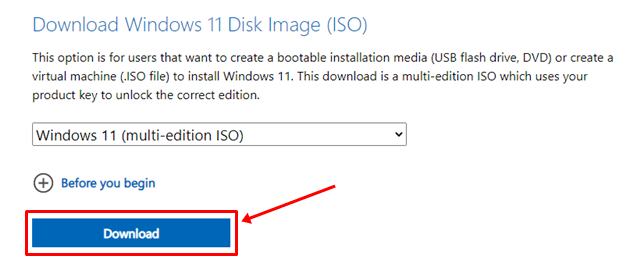
- That’s it. Now, hit the Download button. Then, choose the language you want to download Windows 11 and hit the Confirm button.
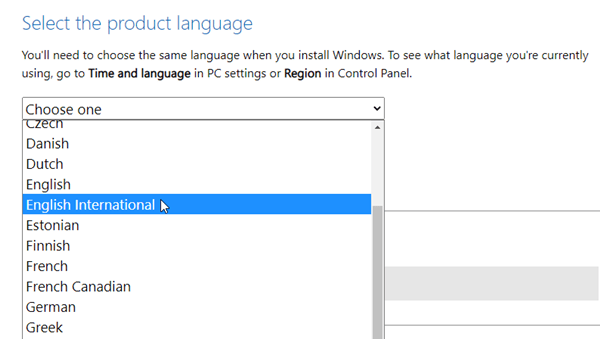
- Now, the downloading link to get the 64-bit version will appear. Click on it.